
Hotel Booking Engine SEO: How to Get Found and Booked

Your booking engine does not rank on Google. Your website does. But the engine decides whether the visitors your pages attract can book, whether Google can read your rates, and whether the money stays with you. Get those three things right and your site stops being a brochure and becomes your best booking channel.
This guide walks through what matters, in the order we would tackle it: where the engine sits on your site, how fast it loads, how to mark up your prices, how to show up in Google’s free booking links, and what to write so you win the searches the big travel sites cannot.
Key takeaways
- Keep the booking flow on your own domain. Redirects to a third-party page split your traffic, your data and your tracking.
- Tell Google your rates in a way it can read: Hotel and HotelRoom structured data that matches the prices guests see on the page.
- Speed is part of SEO and part of conversion. Heavy galleries and a slow widget cost you both rankings and bookings.
- Win long-tail, local, high-intent searches, such as a neighborhood plus a feature, instead of fighting online travel agencies (OTAs) for broad terms.
- Free Google booking links send guests to your engine at no commission, so your engine has to be ready for that traffic.
Table of Contents
- Why the booking engine matters for SEO at all
- Where your booking engine lives on the page
- Make your rates readable: structured data for hotels
- Speed is an SEO feature and a booking feature
- Win the searches OTAs cannot
- Show up in Google’s free booking links
- What to look for in a booking engine, through an SEO lens
- Our perspective: SEO only pays if you keep the booking
- Where Hotelia fits
- A 30-day plan you can start today
- FAQ
- Sources
Why the booking engine matters for SEO at all
SEO for a hotel has a quirk. According to SEO.BO, hotels depend heavily on local data such as Google Business Profile, and the actual transaction often happens on a third-party booking engine, which makes tracking harder. That second part is the piece you control.
Think of the journey as one chain: a search, a page on your site, a room choice, a payment. If the chain breaks at the booking step, all the SEO work before it earns nothing. A button that goes nowhere, a redirect to an unfamiliar domain, or a widget that hides prices from crawlers all break it in different ways.
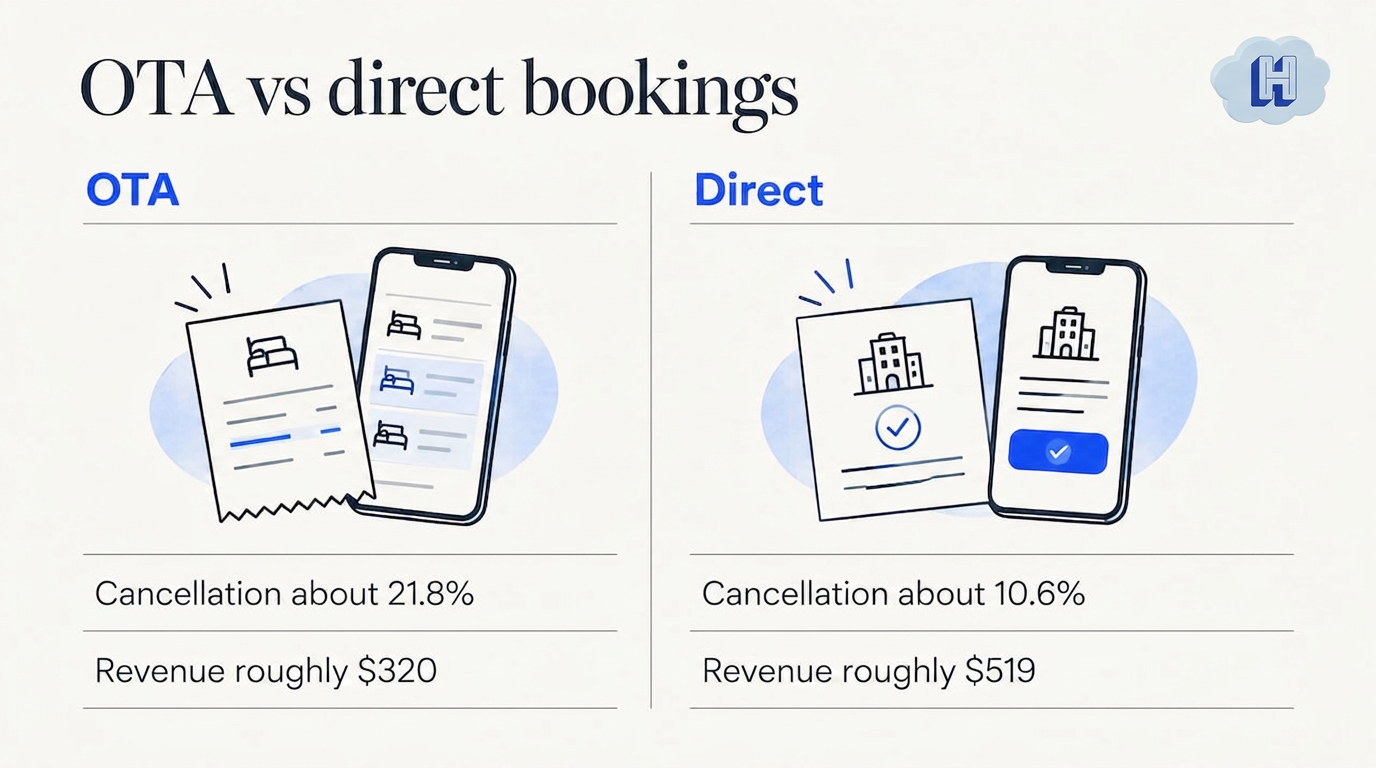
There is also the money question. The research behind one direct-booking website guide puts OTA commissions at 15 to 25% of each booking, and reports direct bookings cancel less often (about 10.6% versus 21.8%) and bring higher revenue per reservation (roughly $519 versus $320). Treat those as the guide’s figures, not a promise for your property. The direction is still clear: each search visit you convert on your own site is worth more than the same guest arriving through an OTA.
Where your booking engine lives on the page
There are two broad ways a hotel website connects to a booking engine.
- Redirect. The “Book now” button sends guests to another domain with different branding, different navigation and a different tracking setup.
- Embedded. The booking flow runs inside your own pages, in your branding, on your domain.
For SEO, embedded wins for three reasons.
- Your pages keep the signal. Guests who stay on your site keep engaging with your content, and your analytics see the whole session instead of losing it at the handoff.
- Your tracking stays whole. Google Tag Manager events can fire at every step, from date selection to confirmation, so you can see which search pages produce reservations.
- Your prices can be marked up. Structured data on your own pages can describe the rooms and rates guests see. That is much harder when the rates live on someone else’s page.
The same guide flags another trap: an engine that forces page reloads or sends guests off-site is a silent conversion killer. It recommends a lightweight engine that does not block the main thread and a mobile checkout that takes roughly 30 to 40 seconds.
If you want the technical detail on embedding without hiding rates, we wrote it up in embedding a booking engine without hiding prices from Google.
Make your rates readable: structured data for hotels
Google has a specific system for checking hotel prices. Its hotel price structured data reference explains that Hotel and HotelRoom markup helps Google validate the prices it shows in Google Hotels, and that the values must match what is visible on your page. Required properties for a Hotel include name, address and the offers it makes.
The practical rules:
- Match the page. If the markup says $189 and the page says $209, you create a mismatch, not an advantage.
- Mark up rooms, not just the property. HotelRoom with its own offers and pricing tells Google what each room type costs.
- Keep it current. Markup that goes stale is worse than none. Prices should update from the same source as the booking flow.
- Let the crawler walk your funnel. Google also publishes a guide to crawler navigation and price tagging. It describes tagging your site with microdata and navigation attributes so Google’s price accuracy crawler can move through your booking funnel and check your rates.
Note that Google describes this markup as being for price validation in Google Hotels. It does not change other structured data uses in Search. Read the current Google documentation before you implement, because the supported formats can change.
For a plain-English walkthrough, see our post on hotel schema markup and accurate prices.
Speed is an SEO feature and a booking feature
Hotel sites are image-heavy: rooms, pool, views. Those galleries are often what slow the page. Mobile makes it worse. The direct-booking guide cited above reports that roughly 60% of travel searches happen on mobile and that top-converting sites load in under 3 seconds. Those are that guide's figures, so use them as a benchmark, not a guarantee. The broader pattern is well established: as pages get slower, more visitors leave before they ever see a rate.
Here is a short speed checklist, in the order we would work through it:
- Compress and resize images. A room photo does not need to be 6 MB. Serve modern formats and the right size for each screen.
- Lazy-load galleries. Load the hero image first. Load the rest as the guest scrolls.
- Check the booking widget. Load it without blocking the rest of the page, and test it on a mid-range phone, not only your office laptop.
- Trim scripts. Every chat widget, pop-up and tracker adds weight. Keep the ones you use.
- Re-test after every change. Run Google’s PageSpeed Insights on your home page, a room page and the booking step.
A branded, mobile-optimized booking flow embedded in your site is part of why we built Hotelia the way we did. The guest never lands on a page that looks like someone else’s.
Win the searches OTAs cannot
OTAs have huge ad budgets and domain authority. SEO.BO makes the point that this is why hotels should prioritize niche long-tail queries over head terms. You will not outrank the big travel sites for “hotels in Miami”. You can win “boutique hotel in Wynwood with a rooftop pool”.
The same direct-booking guide says the real battle is long-tail, high-intent local queries, where your specific property features can shine.
Build pages around real guest questions
Research from a Chinese developer site notes that AI-driven search results are increasingly sidelining keyword-stuffed content. It points to granular detail instead: room-specific usage scenarios, such as family versus business travel, and honest answers on things like parking fees and pet friendliness.
That gives you a page plan you can start this week:
- One page per room type. Bed setup, size, view, who it suits, and a live “Check availability” button.
- A parking page or section. Cost, height limits, how to get in. Guests search for this.
- A pets page. Fees, rules, which rooms. Say it plainly.
- Neighborhood pages. Walking distances, restaurants, and why guests pick your area.
- Occasion pages. Weekend away, wedding guests, work trips, whatever your real guests are.
Every one of these pages should end in the same place: a booking button that works, with the rate visible.
Keep your Google Business Profile tight
Because hotels are a local category, your profile matters as much as your site. Keep your name, address, phone, photos and website link consistent, and point the website link to a page where guests can book. Profile and website should tell the same story.
Show up in Google’s free booking links
When guests compare prices in Google Hotels, they often see both OTA links and links straight to the hotel. A Which? review of comparison sites found that Google Hotels regularly surfaced the cheapest prices, and that experts suggest using such tools to find the lowest rate and then checking the hotel’s own site, where independent owners can often offer perks like breakfast or upgrades. That is the guest behavior you want to meet. Note that Which? is a UK consumer body, so treat this as a signal about traveler habits rather than a US-specific statistic.
A Cornell study on free versus paid hotel listings looked at when Google’s free organic link is enough and when paid placement pays off. The guidance we take from it:
- Treat the free booking link as your baseline.
- If you add paid placements, use them when you have plenty of rooms and low exposure.
- Pause them in high-demand periods, so you do not pay for bookings you would have won anyway.
Whichever route you take, the click lands on your booking engine. If that engine is slow, hides the final price or asks guests to start over, you waste the free click. Our direct booking path guide covers what that landing journey should look like.
What to look for in a booking engine, through an SEO lens
When you compare engines, ask these questions. They apply whatever you choose.
| Question | Why it matters for SEO and bookings |
|---|---|
| Does the flow run on my own domain? | Keeps traffic, tracking and trust in one place. |
| Can I add Google Tag Manager and schema? | You need to measure which pages convert and describe your rates to Google. |
| Is the checkout mobile-first and fast? | Most travel searching happens on phones. |
| Are prices visible before the guest commits? | Surprise fees at the last step lose guests. |
| Who owns the guest data? | Your repeat bookings depend on it. |
| What do I pay per booking? | Commission eats the margin your SEO work created. |
| Does it connect to my property management system? | Live availability avoids overbookings and stale rates. |
We go deeper on this in our booking engine overview.
Our perspective: SEO only pays if you keep the booking
We talk to a lot of independent hoteliers, and the pattern is familiar. They invest in content and a good-looking site, and then the last step hands the guest to a page that feels like a different company. Rankings go up. Bookings do not follow.
We built Hotelia around a simple idea: the booking should happen on your site, the money should go straight to you, and the guest data should be yours. That means a direct booking engine with 0% commission, payments that settle to your account through Stripe, and a property management system behind it so availability is live. Then Revenue Builder adds upsells and add-ons at checkout, priced flat rather than per night, so each booking can earn a bit more.
SEO brings the visitor. The engine, the markup and the checkout decide whether that visit becomes a reservation you keep 100% of. Start with the fixes that cost nothing: clear room pages, honest answers to guest questions, and a booking button that works on a phone.
, Hotelia Team
Where Hotelia fits
If you run an independent or boutique hotel with roughly 5 to 60 rooms, Hotelia gives you the booking engine and a property management system in one all-in-one hotel platform, embedded on your own website. The Hotel and HotelRoom structured data described above is implemented on your pages and is separate from the booking engine, so plan that markup into your site work. There is no commission on bookings. Pricing is a flat $149 per month plus $10 per room, and you can see the plan details on the pricing page. If you want to earn more per stay, take a look at Revenue Builder, our upsell tool.
A 30-day plan you can start today
- Week 1: audit. Test your site speed on mobile. Click through your booking flow as a guest and note every redirect, surprise fee and slow step.
- Week 2: fix the path. Move to an embedded flow if you are redirecting. Make sure the rate is visible before checkout.
- Week 3: add markup and tracking. Implement Hotel and HotelRoom structured data that matches your visible prices. Set up Tag Manager events for each booking step.
- Week 4: write. Publish three pages: your best-selling room type, a parking and pets page, and a neighborhood page. Link each to your booking button.
Then repeat monthly. Add one new page for a real guest question each time. For more fixes on the conversion side, see our direct booking tips and our guide to turning visitors into direct bookings. If commissions are your main concern, read how independent hotels reduce OTA commissions.
FAQ
Does my booking engine affect my Google rankings?
Not directly in the way your page content does. But it shapes speed, user experience, tracking and whether Google can read your rates. A slow or redirecting engine hurts conversion even when rankings are strong.
Should the booking engine be on my own domain?
In most cases, yes. An embedded flow keeps guests in your branding, keeps your analytics intact and lets you mark up prices on your own pages. A redirect to another domain breaks all three.
Do I need schema markup on my hotel website?
If you want Google to validate your prices for Google Hotels, Google documents Hotel and HotelRoom structured data for that purpose. The values must match what guests see on the page. Check Google’s current documentation before you implement, since formats can change.
How do I get my hotel into Google’s free booking links?
You connect your rates and availability to Google’s hotel programs, usually through your booking technology or a connectivity partner. Ask your engine provider what they support, and check Google’s Hotel Center help for current requirements.
What should I target first: broad or long-tail keywords?
Long-tail. Searches that combine a neighborhood with a feature, such as a pool, pets allowed or parking, convert well and face less OTA competition. Broad city terms are dominated by large travel sites.
Sources
- How to Build a Hotel Website That Generates Direct Bookings, DEV Community
- Hotel SEO Strategies for More Direct Bookings, SEO.BO
- Hotel price structured data reference, Google for Developers
- Hotel prices: enable crawler navigation and price tagging, Google for Developers
- Best hotel comparison sites, Which?
- Free vs. Paid Listings, Cornell eCommons
- AI search and hotel content, Alibaba Cloud Developer Community
Recommended
Thanks for reading The Hotelia Dispatch!
Subscribe to get new posts delivered to your inbox.
See Hotelia in Action
Hotelia is a modern booking engine and property management platform built specifically for independent hotels. Keep more of what you earn with 0% commission on direct bookings.