
Hotel Website Design That Turns Visitors Into Direct Bookings

A hotel website that books rooms does a few things well. It shows real rooms and real prices fast. It keeps the book now button in reach on every page. It lets a guest finish checkout on your own site, on a phone, with a keyboard or with a screen reader. Photos and brand style matter, but they come second to a clear path from “I like this place” to “my stay is confirmed.”
This guide is for owners and operators of independent and boutique hotels, inns, lodges and retreats. We walk through the pages, the booking flow, the accessibility basics and the technical details that help Google read your rates. Use it as a punch list for a redesign or a quick audit of the site you have today.
Key takeaways
- Design for the booking, not the brochure. Hotel websites averaged $519 per booking in 2024 versus $320 through OTAs, according to SiteMinder data, so every design choice should shorten the road to checkout.
- Keep the whole booking flow on your own domain, with the total price visible before a guest hands over personal details.
- Accessibility is part of booking design. The U.S. Department of Justice says ADA requirements apply to web services, so test dates, forms, errors and payment with a keyboard and a screen reader.
- Make rates readable by machines as well as people. Google’s price crawler follows a clear, click-based path to a final total.
- Fewer disconnected tools means fewer broken handoffs. A booking engine that talks natively to your property management system keeps availability and rates honest.
Table of Contents
- Why design decisions are revenue decisions
- Start with the guest’s first ten seconds
- Build room pages that answer the questions guests have
- Design the booking flow itself
- Accessibility is part of booking design
- Let flat-fee add-ons raise the value of each stay
- Connect the site to your operations
- A design checklist you can use this week
- Our perspective: keep the site simple and the money yours
- Where Hotelia fits
- FAQ
- Sources
Why design decisions are revenue decisions
The gap between a direct booking and an OTA booking is not small. SiteMinder’s analysis of more than 125 million reservations, reported by Hotel Management in January 2025, put the average hotel website booking at $519 for 2024. The OTA average was $320. A later SiteMinder report, covered by Web in Travel in February 2026, again found hotel websites leading all booking channels, at an average of $516 per booking across about 20 established markets.
These are global industry averages, not a promise for your property. They do show where the value sits. A guest who books on your site tends to book a bigger stay, and you pay no commission on it if your platform charges none.
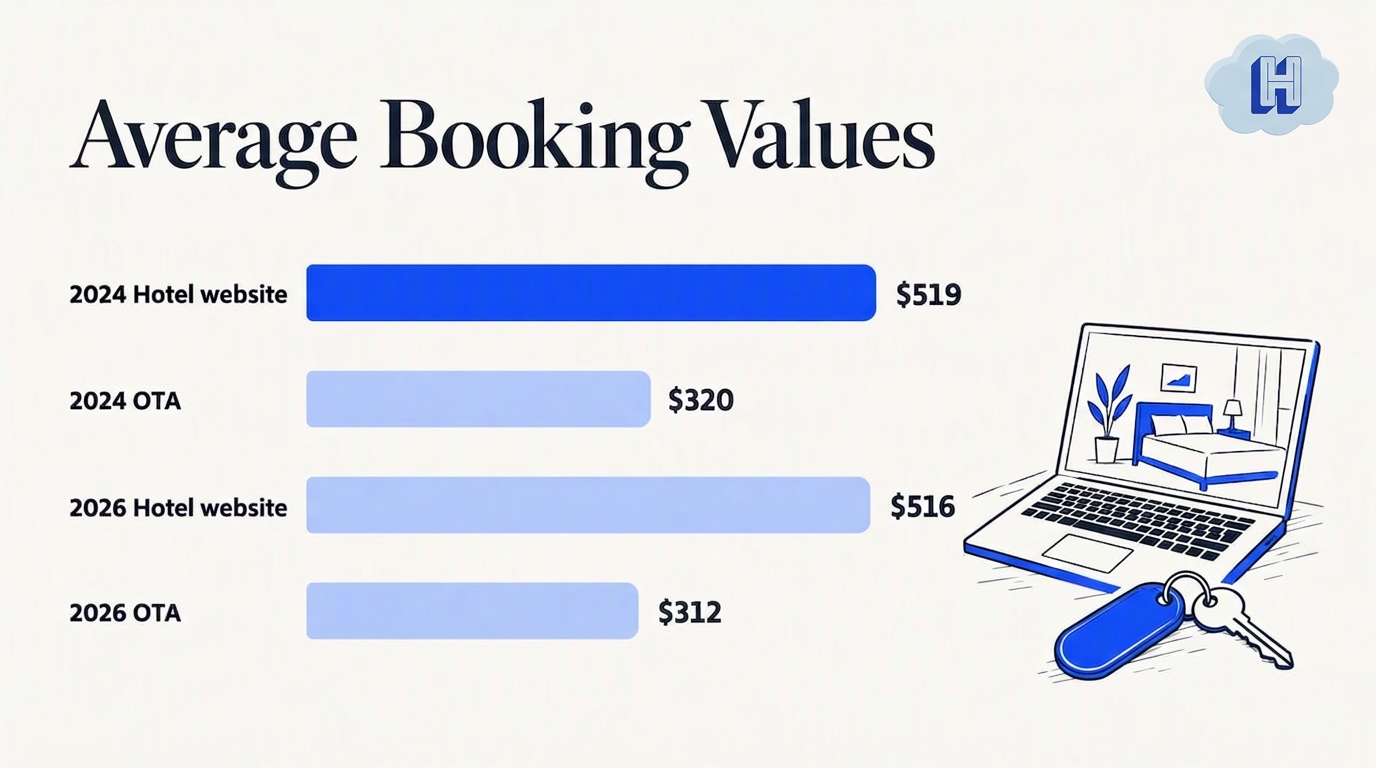
The same Web in Travel piece notes that hotels continuing to invest in website optimization and smooth booking experiences keep seeing higher-value bookings. In other words, the site you already have is probably your biggest unused sales tool. Design is how you put it to work.
One more number, with a caveat. A June 2025 Direct Booking Summit recap reported Google data showing 70% of prospective guests wanted to book directly with hotels. That is an event recap, not a primary Google publication, so read it as a signal of intent, not a conversion guarantee. Many guests would happily book with you. Your site has to make that easy.
Start with the guest’s first ten seconds
A first-time visitor wants three answers right away: where is this, what are the rooms like, and can I get them on my dates. Build the top of your home page around those answers.
- A real photo of your best room or view. Skip the generic stock image. Guests are choosing a place to sleep, so show the place.
- A date and guest picker above the fold. Let a guest check availability without scrolling or opening a menu.
- One plain sentence about who you are. “Twelve-room inn on the river, ten minutes from downtown” beats a paragraph of adjectives.
- A book now button that goes somewhere useful. A button that goes nowhere, or that drops guests on a third-party page with a different logo, costs you trust at the worst moment.
Keep the navigation short. Rooms, Experiences or Things to Do, Location, Contact and a persistent Book button cover most small properties. If a menu item does not help someone book or plan their stay, it can live in the footer.
Make the book button follow the guest
On mobile, a sticky Book button at the top or bottom of the screen means a guest never has to scroll back to find it. Repeat it at natural decision points: after the room gallery, after the rate details, after the reviews. Use the same label everywhere. “Check availability” on one page and “Reserve” on another makes guests wonder if they are different actions.
Design for the phone first
Most browsing happens on a small screen, so design the phone layout first and let the desktop version grow from it. Use large tap targets, short forms and a date picker made for thumbs. Test on a real phone with a normal cellular connection, not only in a desktop browser window resized to look small. Compress images so the first room photo appears quickly.
Build room pages that answer the questions guests have
Room pages do the selling. Treat each one as its own small landing page, not a line in a list.
A strong room page includes:
- Six to ten photos that show the bed, the bathroom, the view and the details that make the room different from the next one.
- Bed type, size and maximum occupancy stated plainly.
- What is included and what costs extra, so there are no surprises at checkout.
- A visible starting price or a live rate for chosen dates.
- Accessibility details for rooms that offer them, written with specifics instead of a generic label.
- Cancellation terms in one or two sentences, not a legal wall.
A wall of five different rate plans overwhelms people. For a small property, two or three clear choices usually work better: for example a flexible rate and a lower non-refundable rate. Name them by what the guest gets.
Use Google’s lodging categories as a content checklist
Google’s lodging data model lists the kinds of information it organizes for a property: policies, food and drink, pools, wellness, activities, transportation, families, connectivity, business facilities, accessibility, pets, parking, housekeeping, health and safety, sustainability and guest-unit features. You do not need to cover every item. But the list is a handy way to spot gaps. If a guest might ask about parking, pets or Wi-Fi before booking, answer it on the page instead of waiting for an email.
Design the booking flow itself
The booking flow is where good-looking sites lose guests. The goal is the fewest steps between a date choice and a confirmed stay, with no surprises.
The sequence that works
- Dates and guests. Ask for nothing else yet.
- Room and rate choice. Show photos and a short description beside each price.
- Add-ons. Offer extras the guest can say yes to in one tap (more on this below).
- Guest details and payment. Ask only for what you need to hold the stay.
- Confirmation. Show the stay summary and what happens next.
Show the total price, including taxes and fees, before the guest has to enter their name or card. This is better for guests and it also matters for search. Google’s hotel price crawler guide explains that the crawler evaluates the funnel step by step and extracts the total stay price from a final page. It expects click-accessible navigation between stages, and a booking site should not need guest names or payment details merely to reveal the rate.
If you also run metasearch or Google’s hotel listings, a flow that hides rates behind form fields can fail validation. Keep dates, occupancy, room details, taxes, fees and the total readable on the page.
Keep guests on your domain
Sending a guest to a separate site with a different look right at checkout is a classic leak. Branded, embedded booking flows that live on your own website keep the experience consistent and keep the guest’s trust. Our post on direct booking paths for independent hotels goes deeper on how to map the route from each traffic source to checkout, and 7 revenue leaks to fix is a good companion audit.
Sort out the forms
Every field you remove helps. Ask for name, email, phone and payment. Put special requests in an optional box. Explain why you need a field if it is not obvious. Show validation errors next to the field in plain words, such as “Please enter a check-out date after your check-in date,” not a red outline with no message.
Accessibility is part of booking design
A guest who cannot complete a booking on your site is a guest you lose, and in the U.S. it can also be a legal issue. The Department of Justice’s web accessibility guidance under the ADA says that businesses open to the public must provide equal access and effective communication, and that these requirements apply to goods and services offered on the web. The guidance does not prescribe one technical standard for every business. It points to WCAG and Section 508 as useful technical references, and it recommends pairing automated checks with manual testing.
There is also a booking-specific point. Advocacy guidance from the Paralyzed Veterans of America says that if a hotel offers online reservations for non-accessible rooms, it must also offer accessible rooms for online reservation instead of asking guests to call. Check your own site for any room type that says “call to book.” If you are unsure what applies to your property, talk to an attorney who handles ADA matters.
A practical test for your booking flow
The useful question is not “does the site look accessible?” It is “can a guest complete the same task?” Run through the flow yourself:
- Keyboard only. Put the mouse away. Can you tab to the date picker, choose dates, move to the room list, select a rate and reach payment? Is the focus always visible?
- Labels and errors. Does every field have a visible label? When you leave one blank, does the error say what is wrong and where?
- Screen reader. Turn on VoiceOver on a Mac or iPhone, or NVDA on Windows. Listen to a room page and the checkout. Are headings in order? Do photos have helpful alt text, such as “King bed with a window seat overlooking the garden”?
- Contrast and zoom. Is text easy to read against its background? Zoom the page to 200% and make sure nothing overlaps or disappears.
- Captions. If you use video, add captions.
Accessibility overlays and widgets are not a substitute for this work. The DOJ’s own advice is that automated checkers help but should be combined with manual testing. Fix the underlying page, then test again after every redesign.
When you evaluate any booking engine, ask how its date picker, forms and payment step behave with a keyboard and a screen reader. Test it in a trial before you commit.
Let flat-fee add-ons raise the value of each stay
A direct booking is already worth more on average. Add-ons are how you push that further. Breakfast, early check-in, a bottle of wine on arrival, a late checkout or a bike rental are the kinds of extras guests will often say yes to when they appear at the right moment.
Design tips:
- Offer add-ons inside the booking flow, after the room choice and before payment, when the guest is already committed.
- Keep the list short. Three to five extras with a photo and one line each.
- Price them plainly. A flat price per add-on is easy to understand. “Welcome bottle, $35” is clearer than a formula.
- Make them optional with one tap, and never pre-check a box on the guest’s behalf.
This is the second half of what independent hotels need: keep 100% of the booking and earn more from each stay.
Connect the site to your operations
A beautiful site that is not connected to your reservations leads to double bookings and awkward emails. The booking engine and the property management system should work from the same availability and the same rates, so that a booking made at 11 p.m. appears at the front desk the next morning without retyping.
The State of Distribution Report 2025 from RateGain points to the risk of buying disconnected tools, as integration problems and limited analytical capacity can block their value. It also identifies the PMS and revenue-management system among the most-used or highest-priority technology for hotels. For a lean property, that supports a simple order of operations: get reservations, room status, payments and reporting working reliably first, then add advanced tools when a clear workflow or revenue case exists.
If you are comparing systems, our PMS and booking engine integration tests give you six checks to run before you sign anything.
A design checklist you can use this week
| Area | What to check | Done? |
|---|---|---|
| Home page | Real photo, date picker and Book button visible without scrolling | |
| Navigation | Five or six items, a persistent Book button | |
| Mobile | Sticky Book button, thumb-friendly date picker, fast first photo | |
| Room pages | Photos, bed and occupancy, inclusions, live or starting price, cancellation terms | |
| Rates | Two or three clear options, named by what the guest gets | |
| Booking flow | Five steps or fewer, total price shown before personal details | |
| Domain | Checkout stays on your site and in your branding | |
| Add-ons | Three to five optional extras with flat prices | |
| Accessibility | Keyboard, screen reader, labels, errors, contrast, zoom tested by a person | |
| Search | Taxes, fees and total readable in a click-through path for Google |
Work through the table from top to bottom. The first rows cost the least and often move the numbers most.
Our perspective: keep the site simple and the money yours
We build Hotelia for independent and boutique hotels with lean teams, roughly 5 to 60 rooms, where the owner often handles the front desk, the website and the books in the same day. What we hear from that kind of operator is rarely “we need a fancier site.” It is “I want guests to book here instead of on a marketplace, and I want to keep what they pay.”
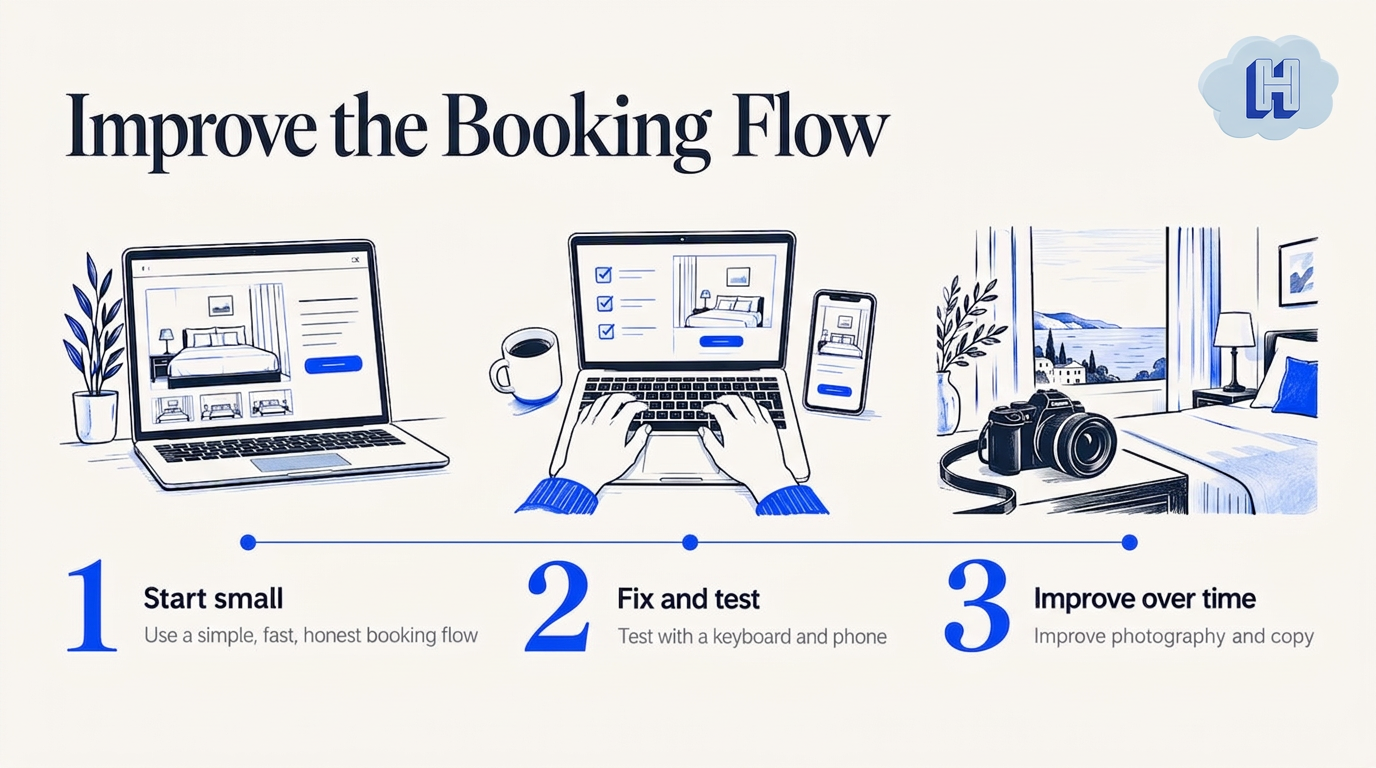
So our view of hotel website design is plain. Pick a clean layout, show real rooms, and put the booking engine on your own site so the guest never leaves your brand. Do not stack five tools that each need their own setup. An all-in-one hotel platform that combines a direct booking engine, a property management system and flat-fee upsells means fewer handoffs to break, and fewer logins to remember.
We would also rather you start small. A simple site with a fast, honest booking flow beats an elaborate one with a clunky checkout. Fix the flow, test it with a keyboard and a phone, then improve the photography and copy over time.
Hotelia Team
Where Hotelia fits
Hotelia is a direct booking platform and property management system in one. The booking engine runs on your own website at 0% commission, with payments settling to your hotel through Stripe. The property management side covers reservations, front desk check-in and check-out, and live room status, and you can see how the features fit together. Revenue Builder adds flat-priced upsells and add-ons to checkout, so you earn more from each stay without per-night pricing.
Pricing is a flat $149 per month plus $10 per room, and there is a free trial so you can try the flow on your own site. Details for the Pro plan and Revenue Builder are on the pricing page. Hotelia does not take commission or revenue share on bookings or add-ons.
FAQ
What should a hotel booking website include?
At minimum: a live date and guest picker, individual room pages with photos and clear prices, a short checkout that shows the total before payment, clear cancellation terms and a mobile layout that works with one thumb. Add contact details, location information and answers to common questions about parking, pets and check-in. Keep everything on your own domain.
How do I make my hotel website accessible?
Follow WCAG as a technical guide, as the DOJ suggests, and test the booking flow by hand. Check keyboard navigation, form labels and error messages, heading order, alt text, contrast and zoom. Combine automated scans with manual and screen-reader testing, and fix problems on the page itself rather than relying on an overlay.
What software do hotels use for bookings?
Most independent hotels use a property management system to hold reservations and room status, and a booking engine to take reservations on their own website. Some platforms combine the two, which cuts down on duplicate entry and sync problems. Choose based on the features you need today, such as payments, reporting and add-ons, and confirm what is live before you buy.
Do I need a new website to take direct bookings?
Not always. Many hotels can embed a branded booking flow into the site they already have and improve the layout step by step. Start with the home page date picker, room pages and checkout, and replace the whole site only if the current one cannot support those basics on mobile.
Sources
- SiteMinder: Direct booking boosts hotel revenue 60% (Hotel Management)
- Hotel direct bookings remain stable despite rise of AI (Web in Travel)
- Top 10 Takeaways from Direct Booking Summit Dallas (Hotel News Resource)
- Guidance on Web Accessibility and the ADA (ADA.gov)
- Hotels FAQs (Paralyzed Veterans of America)
- Hotel prices: enable crawler navigation and price tagging (Google for Developers)
- Lodging, Google Business Profile APIs (Google for Developers)
- The State of Distribution Report 2025 (RateGain)
Recommended
Thanks for reading The Hotelia Dispatch!
Subscribe to get new posts delivered to your inbox.
See Hotelia in Action
Hotelia is a modern booking engine and property management platform built specifically for independent hotels. Keep more of what you earn with 0% commission on direct bookings.